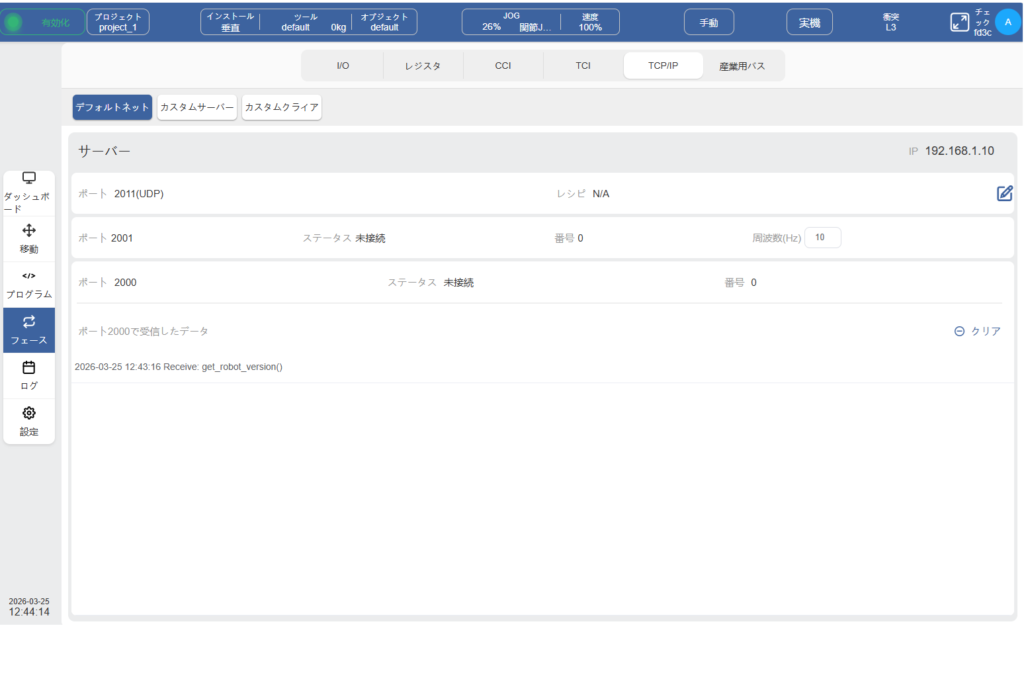
ロボットコントローラーはサーバーとして通信可能(ポート 2000, 2001)
マニュアルにも記載がありますが、ロボットは電源が入るとサーバーとして外部デバイス(クライアント)との接続を待ちます。
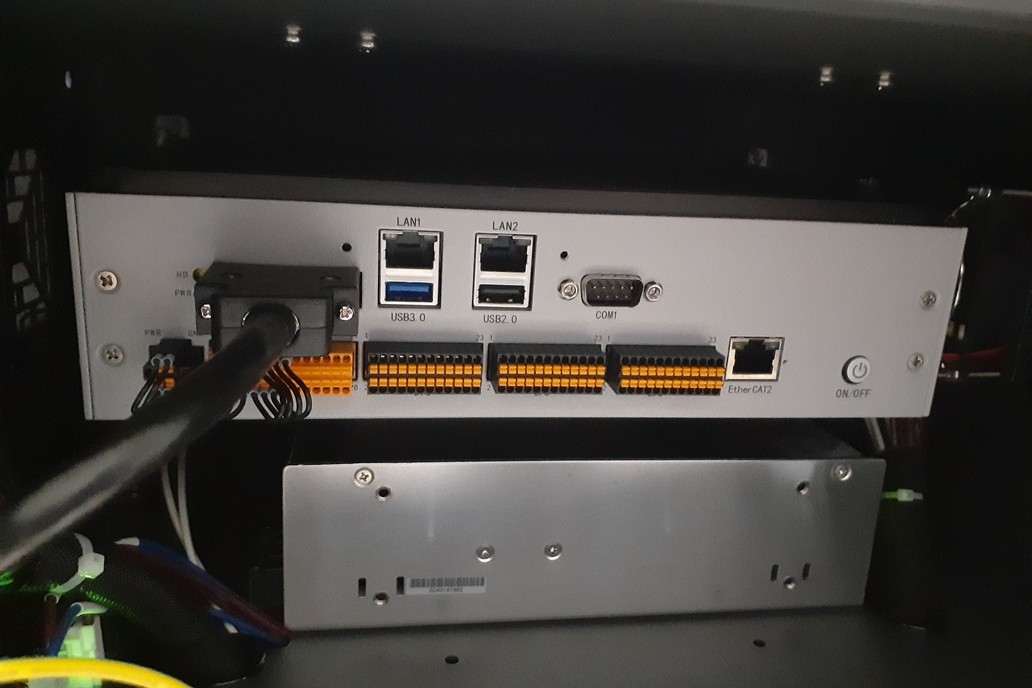
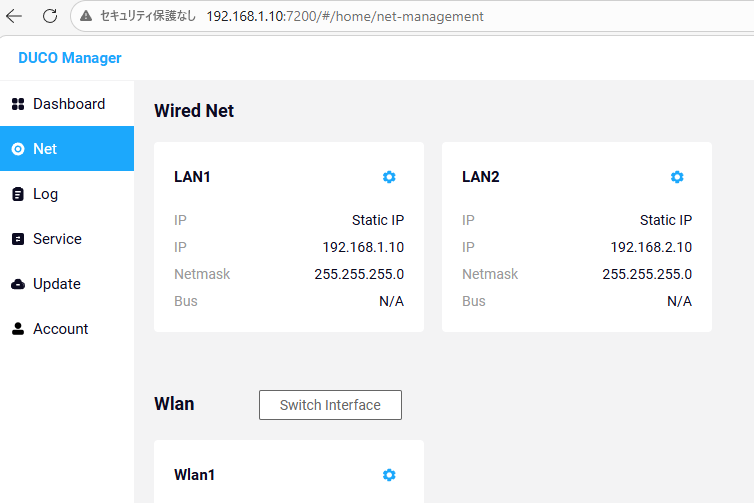
IPアドレスはケーブルを接続したLANポートに対するシステム設定のNET項目の画面で確認します。
ポート2000は、外部からの要求信号を受け入れ、レスポンスを返します。
ポート2001は、クライアント側へ定周期(0.1s間隔)でロボットステータスを送信します。
ロボットステータスをポート2001からPythonコードで取得
1. RobotStatusクラスの定義
ロボットの各種情報を格納するRobotStatusクラスを作成。今回はrobot_status.pyファイルに記述しました。
# ロボットステータス情報を格納
class RobotStatus:

    actual_joint_position: list[float] = [0] * 7
    actual_joint_velocity: list[float] = [0] * 7
    actual_joint_acceleration: list[float] = [0] * 7
    actual_joint_torque: list[float] = [0] * 7
    desired_joint_position: list[float] = [0] * 7
    desired_joint_velocity: list[float] = [0] * 7
    expected_joint_acceleration: list[float] = [0] * 7
    joint_expected_torque: list[float] = [0] * 7
    actual_joint_temperature: list[float] = [0] * 7
    actual_joint_current: list[float] = [0] * 7
    servo_driver_error: list[int] = [0] * 7
    servo_driver_status: list[int] = [0] * 7
    reserved1: bytes = [0] * 32
    tcp_phisycal_position: list[float] = [0] * 6
    tcp_actual_speed: list[float] = [0] * 6
    tcp_actual_acceleration: list[float] = [0] * 6
    actual_external_force: list[float] = [0] * 6
    tcp_desired_position: list[float] = [0] * 6
    tcp_expected_speed: list[float] = [0] * 6
    tcp_expected_acceleration: list[float] = [0] * 6
    theoretical_external_force: list[float] = [0] * 6
    actual_external_force_on_base: list[float] = [0] * 6
    theoretical_external_force_on_base: list[float] = [0] * 6
    active_tool_coordinate_system: list[float] = [0] * 6
    active_workpiece_coordinate_system: list[float] = [0] * 6
    closing_velocity: float = [0] * 4
    global_velocity: int = 0
    jog_speed: int = 0
    reserved2: bytes =  [0] * 58
    features_io_input: bytes = [0] * 8
    function_io_output: bytes = [0] * 8
    digital_io_input: bytes = [0] * 16
    digital_io_output: bytes = [0] * 16
    analog_input: list[float] = [0] * 8
    analog_output: list[float] = [0] * 8
    float_register_input: list[float] = [0] * 32
    float_register_output: list[float] = [0] * 32
    function_bool_register_input: bytes = [0] * 16
    function_bool_register_output: bytes = [0] * 16
    bool_register_input: bytes = [0] * 64
    bool_register_output: bytes = [0] * 64
    word_register_input: list[int] = [0] * 32
    word_register_output: list[int] = [0] * 32
    reserved: bytes = [0] * 31
    real_machine_mode: int = 0
    tool_io_input: bytes = [0] * 8
    tool_io_output: bytes = [0] * 8
    tool_analog_input: list[float] = [0] * 2
    tool_analog_output: list[float] = [0] * 2
    tool_button_status: bytes = [0] * 2
    reserved4: bytes = [0] * 6
    robot_operation_mode: int = 0
    robot_state: int  = 0
    program_running_status: int = 0
    safety_monitoring_status: int = 0
    collision_detection_trigger: int = 0
    collision_axis: int = 0
    reserved5: bytes = [0] * 2
    robot_error_code: bytes = [0] * 4
    reserved6: bytes = [0] * 8

    def __init__(self):
        pass
2. リモート制御用クラスとデータ割り当て用関数 _parse_data(data: bytes)関数の定義
各種モジュールのインポートと外部制御用のクラスDucoRemoteControlを定義。
また同クラスにソケット通信でロボットコントローラーから受信した1468バイトのデータをロボットステータスに割り当てる関数_parse_data(data: bytes)関数を定義。
import socket
import logging
import threading
import time
import struct
import msvcrt
from robot_status import RobotStatus

# リモート制御用クラス
class DucoRemoteControl:

    _ip_adress: str = '192.168.1.10'
    _port_status: int = 2001
    _app_closing = False
    _logger = None
    logger_name: str = __name__
    _robot_status = RobotStatus()
    TCP_TIMEOUT = 0.5

  # 受信したバイト列データをRobotStatusに割り当てる
 def _parse_data(self, data: bytes):

        if len(data) < 1468:
            return None

        index = 0

        for i in range(7):
            self._robot_status.actual_joint_position[i] = struct.unpack('<f', data[index: index + 4])[0]
            index += 4

        for i in range(7):
            self._robot_status.actual_joint_velocity[i] = struct.unpack('<f', data[index: index + 4])[0]
            index += 4

        for i in range(7):
            self._robot_status.actual_joint_acceleration[i] = struct.unpack('<f', data[index: index + 4])[0]
            index += 4

        for i in range(7):
            self._robot_status.actual_joint_torque[i] = struct.unpack('<f', data[index: index + 4])[0]
            index += 4

        for i in range(7):
            self._robot_status.desired_joint_position[i] = struct.unpack('<f', data[index: index + 4])[0]
            index += 4

        for i in range(7):
            self._robot_status.desired_joint_velocity[i] = struct.unpack('<f', data[index: index + 4])[0]
            index += 4

        for i in range(7):
            self._robot_status.expected_joint_acceleration[i] = struct.unpack('<f', data[index: index + 4])[0]
            index += 4

        for i in range(7):
            self._robot_status.joint_expected_torque[i] = struct.unpack('<f', data[index: index + 4])[0]
            index += 4

        for i in range(7):
            self._robot_status.actual_joint_temperature[i] = struct.unpack('<f', data[index: index + 4])[0]
            index += 4

        for i in range(7):
            self._robot_status.actual_joint_current[i] = struct.unpack('<f', data[index: index + 4])[0]
            index += 4

        for i in range(7):
            self._robot_status.servo_driver_error[i] = struct.unpack('<I', data[index: index + 4])[0]
            index += 4

        for i in range(7):
            self._robot_status.servo_driver_status[i] = struct.unpack('<I', data[index: index + 4])[0]
            index += 4

        index = 368

        for i in range(6):
            self._robot_status.tcp_phisycal_position[i] = struct.unpack('<f', data[index: index + 4])[0]
            index += 4

        for i in range(6):
            self._robot_status.tcp_actual_speed[i] = struct.unpack('<f', data[index: index + 4])[0]
            index += 4

        for i in range(6):
            self._robot_status.tcp_actual_acceleration[i] = struct.unpack('<f', data[index: index + 4])[0]
            index += 4

        for i in range(6):
            self._robot_status.actual_external_force[i] = struct.unpack('<f', data[index: index + 4])[0]
            index += 4

        for i in range(6):
            self._robot_status.tcp_desired_position[i] = struct.unpack('<f', data[index: index + 4])[0]
            index += 4

        for i in range(6):
            self._robot_status.tcp_expected_speed[i] = struct.unpack('<f', data[index: index + 4])[0]
            index += 4

        for i in range(6):
            self._robot_status.tcp_expected_acceleration[i] = struct.unpack('<f', data[index: index + 4])[0]
            index += 4

        for i in range(6):
            self._robot_status.theoretical_external_force[i] = struct.unpack('<f', data[index: index + 4])[0]
            index += 4

        for i in range(6):
            self._robot_status.actual_external_force_on_base[i] = struct.unpack('<f', data[index: index + 4])[0]
            index += 4

        for i in range(6):
            self._robot_status.theoretical_external_force_on_base[i] = struct.unpack('<f', data[index: index + 4])[0]
            index += 4

        for i in range(6):
            self._robot_status.active_tool_coordinate_system[i] = struct.unpack('<f', data[index: index + 4])[0]
            index += 4

        for i in range(6):
            self._robot_status.active_workpiece_coordinate_system[i] = struct.unpack('<f', data[index: index + 4])[0]
            index += 4

        for i in range(4):
            self._robot_status.closing_velocity[i] = struct.unpack('<f', data[index: index + 4])[0]
            index += 1

        self._robot_status.global_velocity = data[index]
        index += 1

        self._robot_status.jog_speed = data[index]
        index += 1

        index = 720
        for i in range(8):
            self._robot_status.features_io_input[i] = data[index]
            index += 1

        for i in range(8):
            self._robot_status.function_io_output[i] = data[index]
            index += 1

        for i in range(16):
            self._robot_status.digital_io_input[i] = data[index]
            index += 1

        for i in range(16):
            self._robot_status.digital_io_output[i] = data[index]
            index += 1

        for i in range(8):
            self._robot_status.analog_input[i] = struct.unpack('<f', data[index: index + 4])[0]
            index += 4

        for i in range(8):
            self._robot_status.analog_output[i] = struct.unpack('<f', data[index: index + 4])[0]
            index += 4

        for i in range(32):
            self._robot_status.float_register_input[i] = struct.unpack('<f', data[index: index + 4])[0]
            index += 4

        for i in range(32):
            self._robot_status.float_register_output[i] = struct.unpack('<f', data[index: index + 4])[0]
            index += 4

        for i in range(16):
            self._robot_status.function_bool_register_input[i] = data[index]
            index += 1

        for i in range(16):
            self._robot_status.function_bool_register_output[i] = data[index]
            index += 1

        for i in range(64):
            self._robot_status.bool_register_input[i] = data[index]
            index += 1

        for i in range(64):
            self._robot_status.bool_register_output[i] = data[index]
            index += 1

        for i in range(32):
            self._robot_status.word_register_input[i] = struct.unpack('<h', data[index: index + 2])[0]
            index += 2

        for i in range(32):
            self._robot_status.word_register_output[i] = struct.unpack('<h', data[index: index + 2])[0]
            index += 2

        index = 1407
        self._robot_status.real_machine_mode = data[index]
        index += 1

        self._robot_status.robot_state = data[index]
        index += 1

        self._robot_status.program_running_status = data[index]
        index += 1

        self._robot_status.safety_monitoring_status = data[index]
        index += 1

        self._robot_status.collision_detection_trigger = data[index]
        index += 1

        self._robot_status.collision_axis = data[index]
        index += 1

        index = 1456
        for i in range(4):
            self._robot_status.robot_error_code[i] = data[index]
            index += 1
3. ソケット通信の開始と周期的にデータ受信を行う関数の定義
ソケット通信の開始と周期的にデータ受信を行う関数_received_robot_statusの定義を記述します。今回は本変数内のループ部にprint()関数にて取得したロボットのTCP座標を表示するようにしています。
import socket
import threading
import time
import struct
import msvcrt
from robot_status import RobotStatus

# リモート制御用クラス
class DucoRemoteControl:

    # (中略)

    # ソケット通信でロボットコントローラーからデータを受信する
    def _received_robot_status(self):

        try:
            # ソケット接続の開始
            s = socket.create_connection((self._ip_adress, self._port_status))

            self._logger.info(f"DUCOロボットと接続しました ({self._ip_adress}: {self._port_status})")

        except (ConnectionRefusedError, TimeoutError):
            self._logger.warning(
                f"DUCOロボットとの接続に失敗しました ({self._ip_adress}: {self._port_status})")
            time.sleep(0.01)
            return False

        except AttributeError:
            self._logger.warning(f"DUCOロボットとの接続に失敗しました ({self._ip_adress}: {self._port_status})")
            return False

        while not self._app_closing:
            try:
                rcv_data = s.recv(3000)[0:]

            except TimeoutError:
                time.sleep(0.05)
                continue

            except OSError:
                time.sleep(0.05)
                self._logger.warning("データ受信に失敗しました")
                continue

            self._parse_data(rcv_data)

            # 今回はここでtcp_phisycal_positionを出力する
            print(f"current_coordinates: {self._robot_status.tcp_phisycal_position}")

            time.sleep(0.05)
        return True
4. 外部制御開始用関数の定義
run()関数でログ出力設定とデータ受信をループするスレッド設定を行います。
import socket
import threading
import time
import struct
import msvcrt
from robot_status import RobotStatus

# リモート制御用クラス
class DucoRemoteControl:

    # (中略)
   # リモート制御を開始する関数
   def run(self):

        self._logger = logging.getLogger(self.logger_name)
        sh = logging.StreamHandler()
        self._logger.addHandler(sh)

        formatter = logging.Formatter(
            "%(asctime)s:%(lineno)d:[%(levelname)s]: %(message)s")
        sh.setFormatter(formatter)

        thread = threading.Thread(target=self._received_robot_status)
        thread.daemon = True
        thread.start()

        # 何かキーを押すとステータス取得を終了
        msvcrt.getch()
        self._app_closing = True
        time.sleep(1)
5. メイン関数と実行結果
メイン関数
if __name__ == '__main__':
    remote_control = DucoRemoteControl()
    remote_control.run()
実行結果

ロボットへ制御指令を送信してロボットを動作させる。
ポート2000にクライアントとして接続し、文字列'run(test.jspf)'を送信することでロボットコントローラーに登録されたプログラム’test.jspf’を実行します。
要求が成功した場合は、ロボットコントローラーから'run start\n'が送信され、失敗した場合は’run fali\n'が送信されます。
import socket
import logging
import time

# リモート制御用クラス
class DucoRemoteControl:

   _ip_adress: str = '192.168.1.10'
    _port_command: int = 2000
    _logger = None
    logger_name: str = __name__

    def request_run(self):

        self._logger = logging.getLogger(self.logger_name)
        sh = logging.StreamHandler()
        self._logger.addHandler(sh)

        formatter = logging.Formatter(
            "%(asctime)s:%(lineno)d:[%(levelname)s]: %(message)s")
        sh.setFormatter(formatter)
        self._logger.setLevel(10)

        client = socket.socket(socket.AF_INET, socket.SOCK_STREAM)
        client.connect((self._ip_adress, self._port_command))

        # プログラムを開始させる指令の文字列
        msg = 'run(test.jspf)'
        client.sendall(msg.encode('UTF-8'))
        time.sleep(0.5)

        data = client.recv(256)
        self._logger.info(f"ロボットコントローラーから{data}を受信")

        client.close()

if __name__ == '__main__':
    remote_control = DucoRemoteControl()
    remote_control.request_run()
コントローラーの受信データのチェック
ティーチングペンダントでフェース→TCP/IP→デフォルトネットを選択するとポート2000で受信したデータを確認できます。