
OpenCascadeで入出力可能なファイル形式を紹介します。
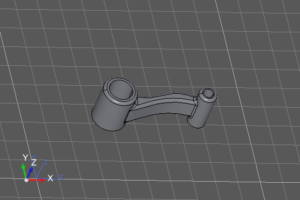
本ページでは、OpenCASCADE(OCCT)におけるCADデータの入力(Import)および出力(Export)方法をまとめます。
OpenCASCADEでは主に以下のフォーマットに対応しています:
- STEP(.stp)
- IGES(.igs)
- BRep(.brep)
- STL(.stl)
- VRML(出力のみ)
1. 対応フォーマット
| フォーマット | 用途 | 特徴 |
|---|---|---|
| STEP | CADデータ互換 | 最も推奨。アセンブリや属性保持 |
| IGES | CADデータ互換 | 古い形式の互換手段 |
| BRep | 内部保存 | OpenCascadeのネイティブ形式 |
| STL | 3Dプリンタ・測定データ解析 | 点群・メッシュ |
| VRML | Web表示・3Dビューワ連携向け |
2. OpenCASCADEの基本構造
OpenCASCADEでは、すべての形状は プログラム内ではTopoDS_Shapeオブジェクト として扱われます。
エクスポート処理の基本フロー:
- Shape(TopoDS_Shape)を取得
- Writerクラスへ渡す
- ファイルとして出力
3. 入力(Import)用関数サンプル
3-0. 使用するパッケージ
//STEP入力
#include <StlAPI_Reader.hxx>

//BRep入力
#include <BRep_Builder.hxx>
#include <BRepTools.hxx>

//STL入力
#include <StlAPI_Reader.hxx>

//IGES入力
#include <IGESControl_Reader.hxx>

//参照ライブラリ
#pragma comment(lib, "TKSTEP.lib")
#pragma comment(lib, "TKBRep.lib")
#pragma comment(lib, "TKStl.lib")
#pragma comment(lib, "TKIGES.lib")
3-1. STEP入力
bool ImportStep(Handle(AIS_InteractiveContext) aISContext, std::string fileName)
{
	STEPControl_Reader aReader;
	IFSelect_ReturnStatus aStatus = aReader.ReadFile(fileName.c_str());

	if (aStatus != IFSelect_RetDone)
		return false;

	aReader.PrintCheckLoad(false, IFSelect_ItemsByEntity);
	int aNbRoot = aReader.NbRootsForTransfer();

	for (Standard_Integer n = 1; n <= aNbRoot; n++)
	{
		Standard_Boolean ok = aReader.TransferRoot(n);
		int aNbShape = aReader.NbShapes();
		if (aNbShape == 0)
			continue;

		for (int i = 1; i <= aNbShape; i++)
		{
			TopoDS_Shape aShape = aReader.Shape(i);
			aISContext->Display(new AIS_Shape(aShape), false);
		}
	}

	aISContext->UpdateCurrentViewer();
	return true;
}
3-2. BRep入力
bool ImportBrep(Handle(AIS_InteractiveContext) aISContext, std::string fileName)
{
	TopoDS_Shape aShape;
	BRep_Builder aBuilder;
	Standard_Boolean isResult = BRepTools::Read(aShape, fileName.c_str(), aBuilder);
	if (!isResult)
		return false;

	aISContext->Display(new AIS_Shape(aShape), true);

	return true;
}
3-3. STL入力
bool ImportStl(Handle(AIS_InteractiveContext) aISContext, std::string fileName)
{
	StlAPI_Reader aReader;
	TopoDS_Shape aShape;

	if (!aReader.Read(aShape, fileName.c_str()))
		return false;

	aISContext->Display(new AIS_Shape(aShape), true);

	return true;
}
3-4. IGES入力
bool ImportIges(Handle(AIS_InteractiveContext) aISContext, std::string fileName)
{
	IGESControl_Reader aReader;
	int aStatus = aReader.ReadFile(fileName.c_str());

	if (aStatus != IFSelect_RetDone)
		return false;

	aReader.TransferRoots();
	TopoDS_Shape aShape = aReader.OneShape();

	aISContext->Display(new AIS_Shape(aShape), true);

	return true;
}
4. 出力(Export)用関数サンプル
4-0. 使用するパッケージ
//STEP出力
#include <StlAPI_Writer.hxx>

//BRep出力
#include <BRepTools.hxx>

//STL出力
#include <StlAPI_Writer.hxx>
#include <BRep_Builder.hxx>

//IGES出力
#include <IGESControl_Controller.hxx>
#include <IGESControl_Writer.hxx>

//VRML出力
#include <VrmlAPI_Writer.hxx>
#include <BRep_Builder.hxx>

//参照ライブラリ
#pragma comment(lib, "TKSTEP.lib")
#pragma comment(lib, "TKBRep.lib")
#pragma comment(lib, "TKStl.lib")
#pragma comment(lib, "TKIGES.lib")
#pragma comment(lib, "TKVrml.lib")
4-1. STEP出力
#include <

bool ExportStep(Handle(AIS_InteractiveObject) anIO, std::string fileName)
{
	Handle(AIS_Shape) anIS = Handle(AIS_Shape)::DownCast(anIO);

	STEPControl_StepModelType aType = STEPControl_AsIs;
	IFSelect_ReturnStatus aStatus;
	STEPControl_Writer aWriter;

	aStatus = aWriter.Transfer(anIS->Shape(), STEPControl_StepModelType::STEPControl_AsIs);
	if (aStatus != IFSelect_RetDone)
		return false;

	aStatus = aWriter.Write(fileName.c_str());
	if (aStatus != IFSelect_RetDone)
		return false;

	return true;
}
4-2. BRep出力
bool ExportBRep(Handle(AIS_InteractiveObject) anIO, std::string fileName)
{
	Handle(AIS_Shape) anIS = Handle(AIS_Shape)::DownCast(anIO);

	return BRepTools::Write(anIS->Shape(), fileName.c_str());
}
4-3. STL出力
bool ExportStl(Handle(AIS_InteractiveObject) anIO, std::string fileName)
{
	TopoDS_Compound aComp;
	BRep_Builder aBuilder;
	aBuilder.MakeCompound(aComp);

	Handle(AIS_Shape) anIS = Handle(AIS_Shape)::DownCast(anIO);
	TopoDS_Shape aShape = anIS->Shape();
	if (aShape.IsNull())
		return false;

	aBuilder.Add(aComp, aShape);

	StlAPI_Writer aWriter;
	aWriter.Write(aComp, fileName.c_str());
	return true;
}
4-4. IGES出力
bool ExportIges(Handle(AIS_InteractiveObject) anIO,  std::string fileName)
{
	IGESControl_Controller::Init();
	IGESControl_Writer aWriter(Interface_Static::CVal("XSTEP.iges.unit"),
		Interface_Static::IVal("XSTEP.iges.writebrep.mode"));

	Handle(AIS_Shape) anIS = Handle(AIS_Shape)::DownCast(anIO);
	TopoDS_Shape aShape = anIS->Shape();
	if (!aWriter.AddShape(aShape))
		return Standard_False;

	aWriter.ComputeModel();
	return aWriter.Write(fileName.c_str());
}
4-5. VRML出力
bool ExportVrml(Handle(AIS_InteractiveObject) anIO, std::string fileName)
{
	TopoDS_Compound aRes;
	BRep_Builder aBuilder;
	aBuilder.MakeCompound(aRes);

	Handle(AIS_Shape) anIS = Handle(AIS_Shape)::DownCast(anIO);
	TopoDS_Shape aShape = anIS->Shape();
	if (aShape.IsNull())
		return false;

	aBuilder.Add(aRes, aShape);

	VrmlAPI_Writer aWriter;
	aWriter.Write(aRes, fileName.c_str());

	return true;
}